How to Add a Sitemap in Bing Webmaster Tools
How to Add a Sitemap in Bing Webmaster Tools: Some links here are partner links. It costs you nothing and may pay us a commission.
Last updated: October 13, 2026
Some links here are partner links. It costs you nothing and may pay us a commission.
Quick Answer: In Bing Webmaster Tools, submit your sitemap URL under Sitemaps after verifying the site. If your sitemap is at /sitemap.xml, it usually takes under 1 minute to add, and Bing documents sitemap submission as part of the Webmaster Tools workflow. If Bing shows an error, the problem is usually the sitemap URL, the robots rules, or an unverified property.
Because we focus on search platform setup and technical SEO, we care about the steps that save crawl waste, not the ones that sound tidy on paper. We use Microsoft’s Bing Webmaster Tools help pages, the Bing URL Submission API documentation, and the Sitemaps protocol notes from sitemaps.org.
First published 13 October 2026.
How to add a sitemap in Bing Webmaster Tools
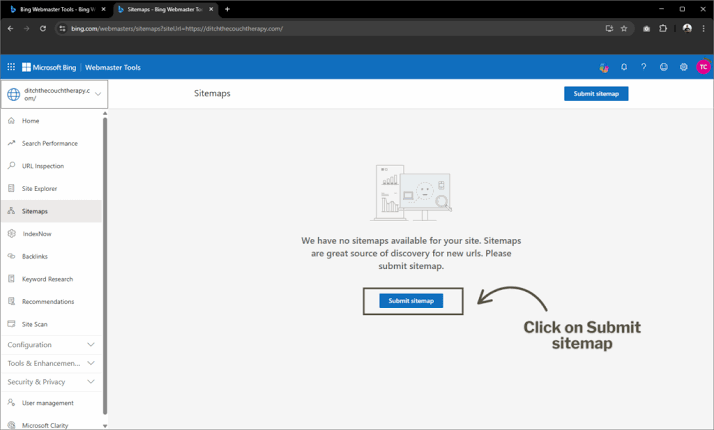
You add a sitemap in Bing Webmaster Tools by signing in, choosing the correct site property, and submitting the sitemap URL under the Sitemaps section. The exact menu label can move a little over time, but the flow stays the same: verify the site first, then point Bing at the XML file.
Here is the clean path most site owners should follow:
- Sign in to Bing Webmaster Tools.
- Open the site property you want Bing to crawl.
- Find the Sitemaps area in the left navigation or site dashboard.
- Paste the full sitemap URL, such as
https://example.com/sitemap.xml. - Submit it and wait for Bing to process it.
For a small site, the whole process is often under 1 minute once the property is verified. For a larger site with a sitemap index, it may take a little longer to confirm the correct file. If your site uses more than one sitemap, submit the index file first. A sitemap index is the file that lists multiple sitemap URLs, and Bing can read that just fine when the site is set up correctly. The Sitemaps protocol from sitemaps.org allows sitemap index files, and Bing documents sitemap submission inside Webmaster Tools as a supported workflow.
A sitemap does not force indexing. It gives Bing a cleaner list of URLs to crawl, which is useful for large sites, new sites, sites with weak internal linking, and sites with pages that are hard to discover from the homepage alone. Google Search Central also notes that sitemaps help search engines discover URLs, but do not guarantee indexing. (Source: Google Search Central)
The mistake most people make is submitting the page URL of the sitemap page instead of the XML file itself. Bing wants the XML endpoint, not a blog post or HTML page that talks about the sitemap.
How do I find the sitemap URL?
You usually find it at /sitemap.xml, but the real answer is whatever your CMS, plugin, or site generator publishes. WordPress SEO plugins often place it at a predictable XML path, while custom sites may use a sitemap index such as /sitemap_index.xml.
Check these places in order:
- Your site footer or robots.txt file, which often lists the sitemap location.
- Your CMS or SEO plugin settings, where sitemap output is usually enabled or disabled.
- Your site source or server rules, if the sitemap is generated outside the CMS.
- Your robots.txt file itself, which may include a
Sitemap:line pointing to the XML file.
If you do not know the exact URL, open the sitemap in a browser first. A valid sitemap should be XML, not a styled web page. It usually starts with <urlset> or <sitemapindex>. If the browser shows a 404, Bing will not be able to use it either. According to the Sitemaps protocol, a sitemap file can list up to 50,000 URLs and should stay under 50 MB uncompressed, so large sites often need more than one file. sitemaps.org
What if Bing says the sitemap failed?
Bing usually fails a sitemap for one of a small number of reasons: the file is blocked, the URL is wrong, the file is malformed, or the property you submitted it to is not verified. Those are the fixes to check first because they are the ones that most often stop sitemap processing.
Start with the URL itself. The sitemap must be reachable by Bing over HTTP or HTTPS, and it should return a 200 status code. If it redirects through several hops, is behind a login wall, or requires JavaScript to expose the XML, that creates avoidable friction.
Then check the file contents. A sitemap must be valid XML, and each URL in it should be canonical and indexable. If the sitemap lists blocked pages, noindex pages, or URLs that redirect elsewhere, Bing gets a noisy map instead of a useful one.
Next, look at robots rules. If robots.txt blocks the sitemap file or blocks the pages listed inside it, Bing may still fetch the sitemap but will not do much with the URLs. That mismatch is a common source of confusion.
If the sitemap is very large, split it. The Sitemaps protocol allows sitemap index files for exactly this reason. Large sites often keep separate sitemaps for posts, products, category pages, images, or language variants. For example, one ecommerce site may use a product sitemap, a blog sitemap, and a localization sitemap instead of one oversized file.
Do I need to submit the sitemap more than once?
You submit it once in Bing Webmaster Tools, but you should update it whenever the sitemap file itself changes in a meaningful way. Bing can revisit the sitemap later, so you do not need to resubmit every time you publish one page. What matters is that the sitemap URL stays live and accurate.
If your sitemap is generated automatically, the better habit is to make sure the generator is reliable, not to babysit Bing. A plugin update, server move, or CMS change can break the XML path without warning, so check it after major site changes, not on a daily timer.
This is where a generic article gets sloppy: it says “submit your sitemap” and stops, as if the XML file were the same as indexing. It is not. Bing still decides what to crawl and what to index.
Why Bing Webmaster Tools is worth the minute it takes
Bing Webmaster Tools is worth using because it gives you a direct way to tell Bing where your site map lives, which can be especially useful on fresh sites and sites with thin internal linking. It is not a magic ranking switch, and you should treat it as a discovery and crawl-management tool, not as a guaranteed ranking lever; if ranking changes or indexing problems persist, consult a qualified SEO professional and the Bing Webmaster Tools help documentation. (Source: Bing Webmaster Tools Help)
The practical value is discovery. A sitemap helps Bing find pages that might otherwise sit too deep in the site structure. That matters for ecommerce catalogs, publishing sites, local businesses with many service pages, and anything with filtered or frequently updated URLs.
The limitation is just as real: submitting a sitemap does not fix weak content, crawl traps, or duplicate URL patterns. If your site architecture is messy, Bing will still have to sort through that mess.
Key takeaways
- The job is simple: verify the site, then submit the XML sitemap URL in Bing Webmaster Tools.
- Use the sitemap file, not a web page that describes the sitemap.
- A sitemap helps Bing discover URLs; it does not guarantee indexing.
- If submission fails, check the URL, XML validity, robots rules, and property verification first.
- Large sites usually do better with a sitemap index than one giant file.
How we compared
We compared Microsoft’s Bing Webmaster Tools help pages, the Bing URL Submission API documentation, and the sitemap standard published by sitemaps.org. We also read common implementation guidance for CMS-generated sitemaps, because the real question is not whether Bing accepts a sitemap; it is where site owners usually break the setup.
This page is based on documentation and implementation patterns, not on claiming personal use. We are not presenting a hands-on test or a usage log, and we do not need one to tell you where the process usually fails.
What would make me choose differently
We would not bother with Bing Webmaster Tools first if the site is brand new, still on a staging domain, or changing URLs every few days. In that stage, the sitemap often changes faster than Bing can make good use of it.
We would also skip the “submit and forget” approach on a site with faceted navigation, duplicate collection pages, or poor canonical rules. In that case, the sitemap is only one piece of cleanup, and the crawl budget problem is bigger than Bing.
For a small brochure site with 10 clean pages, the upside is modest. For a site with hundreds or thousands of URLs, the sitemap step earns its keep quickly because it gives Bing a reliable starting map.
Migration note
Moving from Google Search Console to Bing Webmaster Tools is usually straightforward because both tools understand the same basic sitemap concept. The difference is mostly in the dashboard flow, not in the file itself.
If you already have a sitemap index for Google, you can usually reuse it in Bing as long as it is valid XML and the URLs are crawlable. The harder move is leaving a bad setup behind: if your old sitemap included blocked, redirected, or parameter-heavy URLs, Bing will inherit that noise unless you clean the file before submission.
Leaving Bing later is easy in one sense because the sitemap file stays on your server. The hidden cost is maintenance: if the file is generated by a plugin or build step, you need to remember that the sitemap is part of your publishing system, not a one-time admin task.
FAQ
How long does it take Bing to pick up a sitemap?
Bing can process a sitemap after submission, but the timing for crawl and indexing is not fixed. A sitemap is a discovery signal, not a clock.
Can I submit more than one sitemap?
Yes. You can submit a sitemap index or multiple sitemap files if your site is split into sections such as posts, products, or language versions.
Does Bing need XML, or can I submit an HTML sitemap?
Bing’s sitemap submission workflow is built for XML sitemaps. An HTML sitemap may help users, but it is not the same file format for crawler submission.
What if my sitemap is in robots.txt already?
That helps Bing find it, but we would still submit the sitemap in Bing Webmaster Tools. The explicit submission gives Bing a direct pointer instead of making it discover the file indirectly.
Will a sitemap fix indexing problems?
No. If pages are thin, blocked, duplicate, or canonicalized elsewhere, the sitemap does not override those issues. It only helps Bing find URLs faster.
Drafted with AI; not yet reviewed by a person.